Browse beautifully.
Clean confidently.
The photo library experience Apple forgot to build. 120fps scrolling, filters you can combine, and tools that make cleanup feel right.
100% On-Device
Your photos never leave your phone
No Cloud Uploads
Zero data sent to servers
One-Time Purchase
No subscription, ever
Works Offline
No internet required
"Cannot Take Photo"
Your kid's first steps. Your friend's wedding toast. The moment is gone. Forever.
Your phone is full of photos you don't need.
Your kid's first steps. Your friend's wedding toast. The moment is gone. Forever.
8,421
screenshots
2,109
duplicates
520
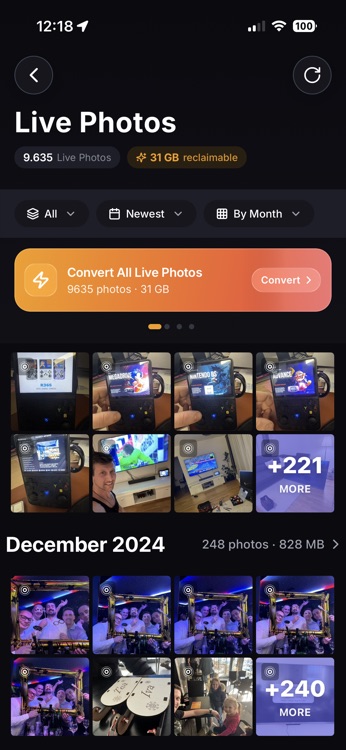
Live Photos
Cannot Take Photo
Storage Full
Unable to Install Update
This update requires 3.4 GB of available storage.
Understand your library. Then clean it.
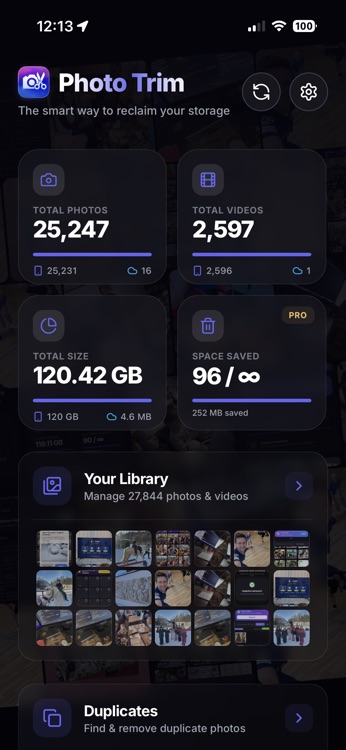
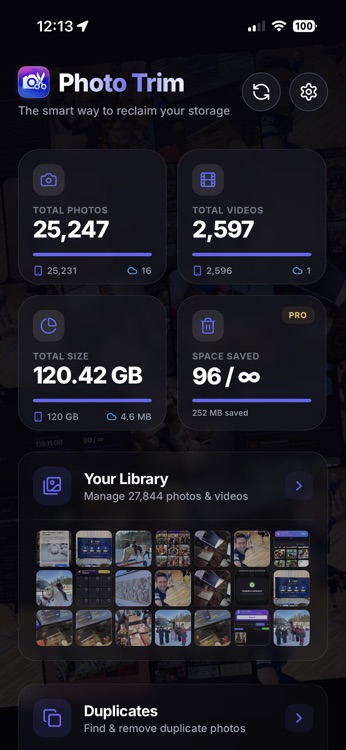
Other apps rush you to delete. Photo Trim gives you the browsing experience your photos deserve — 120fps smooth scrolling, filters you can combine, and the clarity to make confident decisions.
Fast
45s
Safe
30-Day Undo
Private
100% On-Device
Cleanup Complete
Space Recovered
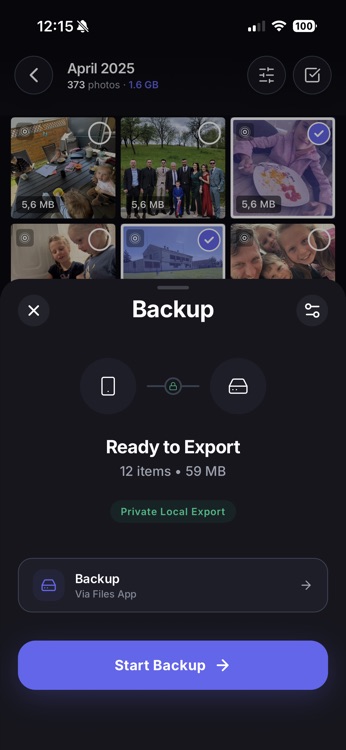
Ready for Export
12,402 Items • 14.2 GB
SSD Drive
Via Files App
Beautiful browsing. Powerful tools.
Start with an experience that makes cleanup feel right. Then use tools that actually work.
What Makes Us Different
The browsing experience your photos deserve.
Other apps rush you to delete. We give you 120fps smooth scrolling, filters you can combine, and the clarity to make confident decisions. You'll actually enjoy browsing your library.
-
120fps Native Scrolling
Buttery smooth — faster than Apple's Photos
-
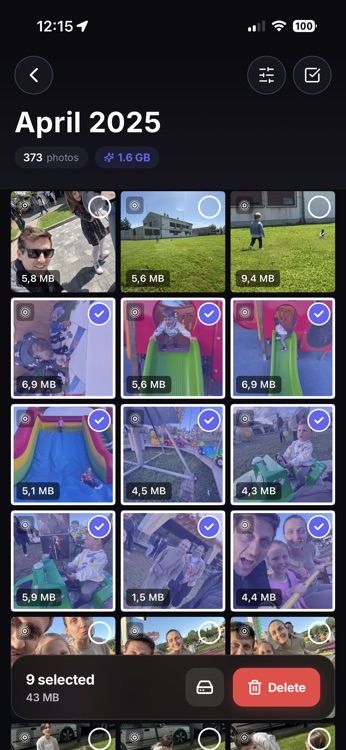
Combined Filters
Type + Date + Source — all at once
-
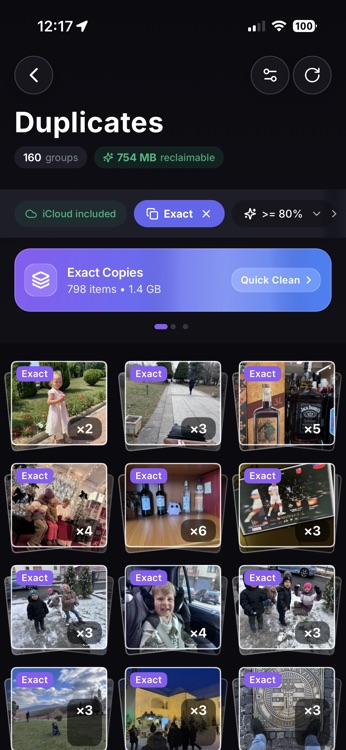
iCloud vs Device Detection
The only app that shows where photos live
-
Full-Screen Preview
See every detail before you decide
Made for you
Whether you're a casual user or a photo enthusiast, Photo Trim helps you take control.
Don't trust us?
Go offline.
Turn on Airplane Mode. Open Photo Trim. Notice how everything still works? That's because we don't need the server. Your photos never leave your device.
The Cloud
Your iPhone
Neural Engine Processing
Local Storage
Zero Uploads
Not for analysis. Not for backup. Not ever. Your photos stay right where they belong: in your pocket.
Local Intelligence
We use Apple's Neural Engine to analyze photos on-device. No remote servers. No AI training on your data.
No Accounts
We don't know who you are. We don't want to know. No login, no email, no user tracking.
Sandboxed Data
Photo Trim runs in a secure OS sandbox. Even our developers cannot access your library.
Start free. Upgrade when ready.
Explore your library with daily limits, or go Pro for unlimited power.
Free Forever
Great for exploring
No credit card required
Pro — Lifetime
One-time purchase · Forever yours
No subscription · No recurring fees
Trusted by thousands to clean their photo libraries.
Real-time stats from Photo Trim users worldwide
Questions? Answers.
Everything you need to know about Photo Trim.
Yes, 100%. All photo processing happens entirely on your iPhone. Your photos never leave your device, never touch our servers, and we have zero access to your library. No accounts, no cloud uploads, no tracking.
Photos go to your iPhone's Recently Deleted album, where they stay for 30 days. You can recover them anytime during this period. Photo Trim uses Apple's standard deletion process, so you're always in control.
Connect any USB-C drive (or Lightning drive with adapter) to your iPhone. Photo Trim lets you select photos and backup directly to the drive. No computer needed, no cloud required. Just plug in and save.
When "Optimize iPhone Storage" is on, your iPhone replaces full photos with tiny thumbnails while originals stay in iCloud. Photo Trim shows you exactly which photos are actually on your device vs in the cloud, so you know what you might lose without WiFi.
Correct. Photo Trim Pro is a one-time purchase of €5.99. No monthly fees, no yearly renewals, no hidden costs. Buy once, use forever. All future updates included.
Photo Trim requires iOS 15 or later. For USB backup features, iOS 16+ is recommended for the best experience with external storage devices.
Try the free version first - it includes unlimited browsing, filtering, duplicate detection, and Live Photo detection. You'll only see the upgrade prompt when you're actively cleaning, which means you're already getting value. No risk, no commitment.
Not yet. Photo Trim is currently iOS only. We're focused on making the best possible iPhone experience first.
Still have questions? Contact us
Ready to reclaim your space?
Start for free. No account required. Works in seconds.
Free to try • €5.99 for Pro • No subscription